
WhatsApp Status Saver
Save viewed statuses from WhatsApp or WhatsApp Business. Connect the matching folder to keep copies of the photos and videos. Supported browsers check that folder automatically while this page is open. Your phone must allow folder access first.
Automatic folder access is unavailable in this browser. You can select a folder or individual status files.
Your files never leave your phone. Nothing is uploaded to SaveClipX.
Find your WhatsApp folder
Internal storage › Android › media › com.whatsapp › WhatsApp › Media › .Statuses
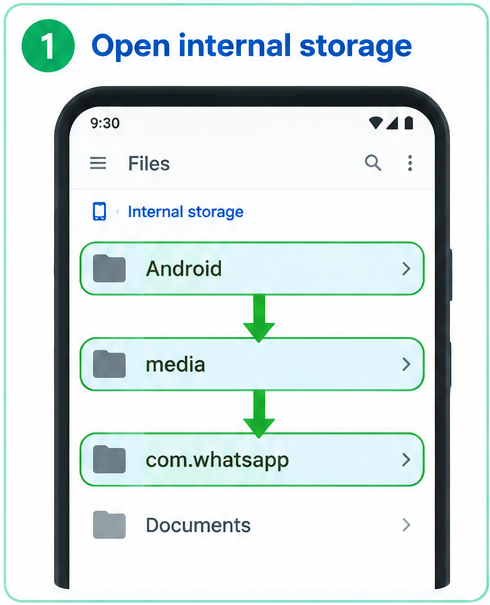
1. Open internal storage
Open Android, then media, then com.whatsapp.
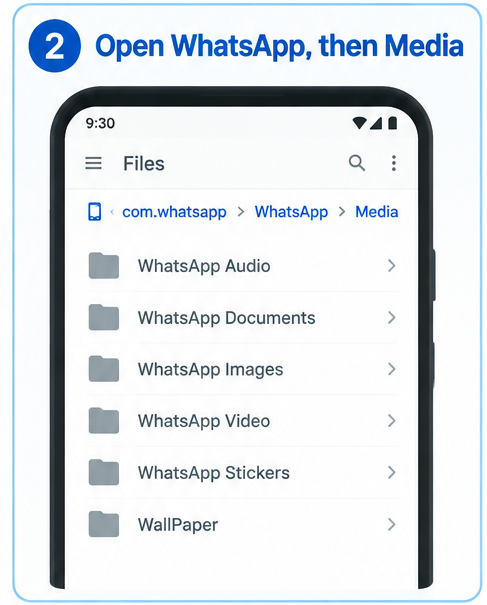
2. Open the Media folder
Open WhatsApp, then Media.
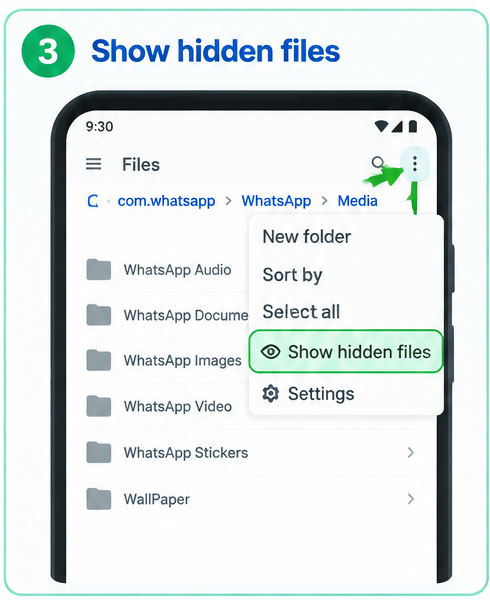
3. Show hidden files
Tap the three dots at the top right, then Show hidden files.
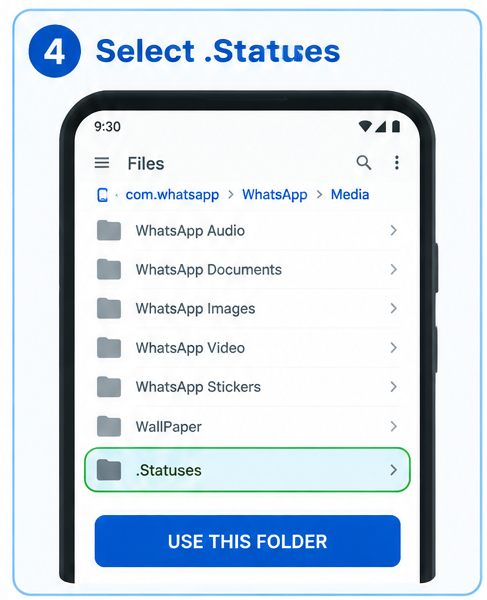
4. Choose .Statuses
Open .Statuses, tap Use this folder, then Allow.
The first video downloader to make this work
We made browser based status saving work, with a remembered folder, automatic refresh and a gallery of your photos and videos. No separate saver app needed. Available on supported Android phones, with desktop support coming soon. Folder access depends on your phone and browser permissions.
Read our browser status saver launch storyHow to save a WhatsApp status
- 1Open WhatsApp and watch the status you want to keep.
- 2Come back here and tap Connect status folder.
- 3Go to Android, then media, then com.whatsapp, then WhatsApp, then Media, then .Statuses, and tap Use this folder.
- 4Save the statuses you want. In supported browsers, new files appear automatically when you return here after watching more statuses.
On older phones the folder sits at WhatsApp, then Media, then .Statuses, in your main storage.
Questions
Can I save a status I have not watched yet?
No. WhatsApp only stores a status on your phone after you watch it, so open it in WhatsApp first, then come back here.
Does this work on iPhone?
iPhone keeps WhatsApp files locked inside the app, so no website or app can reach them. Ask the person to send you the status, or use the screen recorder in Control Center.
Are my statuses uploaded anywhere?
No. The WhatsApp status saver reads the files directly on your phone and saves copies to your Downloads. Nothing is sent to our servers.
I cannot see the Statuses folder. What now?
Some phones hide this folder or prevent browsers from selecting it. If your file picker offers Show hidden files, turn it on. Otherwise use your file manager to copy the status to an accessible folder, then choose that file here. SaveClipX cannot override your phone's restrictions.
Will new statuses appear automatically?
In browsers with folder access, the selected folder is checked while this page is visible, and when you return from WhatsApp. The folder connection is remembered on this device, not the status files. After a refresh, access resumes if Chrome still allows it. Otherwise tap Resume folder access and Allow, without finding the folder again. Clearing site data removes the saved connection, and some browsers only support selecting files.